
How to Set Up a Party in Slime Rebirth : Isekai Awakening (4 Raid Slots)
Party setup in Slime Rebirth : Isekai Awakening runs through the Raid portion: tap Create Party, and the raid lobby shows the four-slot raid party before you confirm Start Raid. Here's the full flow, plus how the combat sidebar and the Recruit gacha connect to your lineup.
Quick answer
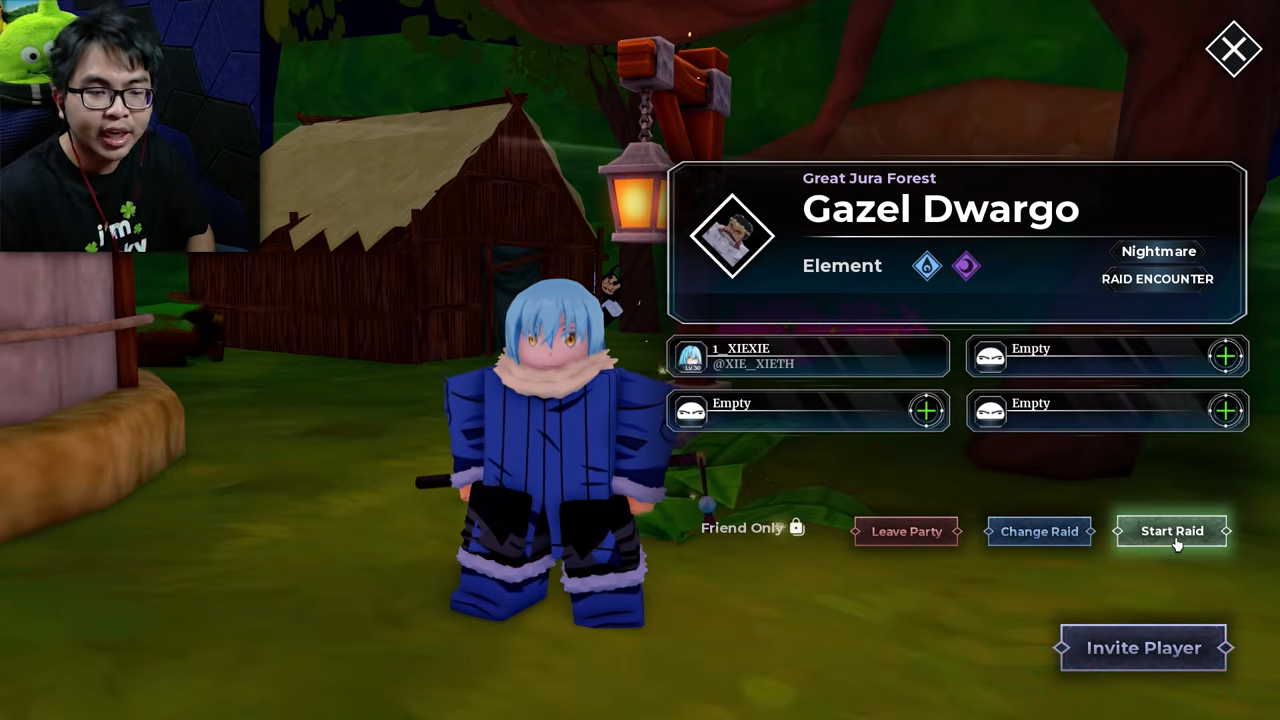
Party setup lives in the Raid portion of Slime Rebirth : Isekai Awakening. Entering Raids brings up a Create Party prompt, the raid lobby shows a four-slot raid party, and confirming Start Raid launches the encounter.
- Where: the Raid portion of the game menu
- Controls: a Create Party prompt, then a Start Raid confirmation
- Raid party UI: four slots
- Example encounter: Great Jura Forest - Gazel Dwargo, listed as a Nightmare RAID ENCOUNTER
Where you set up your party
In Slime Rebirth : Isekai Awakening, the documented path to party setup runs through the Raid portion of the game rather than a separate team menu. The flow the game presents looks like this:
- Open the Raid portion of the game.
- A Create Party prompt appears — accept it to move into party setup.
- The raid lobby lists the available encounter, for example Great Jura Forest - Gazel Dwargo, tagged as a Nightmare RAID ENCOUNTER, together with a four-slot raid party.
- Confirm Start Raid and the raid begins.
That is the entire loop the UI shows you: enter the Raid portion, create the party, start the raid. One scope note worth knowing before you go hunting for the same screens elsewhere: this Create Party → Start Raid sequence is what the Raid portion displays. The same flow has not been observed for Survival mode, so don't assume identical party screens there.
What the raid party UI shows
The raid lobby is where your setup becomes concrete. It names the raid encounter — Great Jura Forest - Gazel Dwargo, flagged as a Nightmare RAID ENCOUNTER — and presents four party slots alongside a Start Raid control. Four slots means the fight uses a four-character raid party, and the lobby is where that four-slot lineup is displayed before you commit.
How your party behaves in combat
Once a battle starts, the lineup you assembled follows you into the fight as a party sidebar. In Great Jura Forest Act 1 combat, the player switched the controlled character from Rimuru Demon Lord to Shuna and then to Gobta through that sidebar, and the available skills swapped accordingly each time.
The practical takeaway: the sidebar reflects the equipped party members available in that battle, so whoever you place in your lineup defines your mid-fight options. Each character you cycle to brings their own skill set, and changing the controlled character changes what you can cast on the fly. Our switch characters page breaks the swapping down further, and the combat controls guide covers the inputs around it.
Filling the four slots: where characters come from
Party slots are only as useful as the roster behind them, and characters come from the Recruit gacha. The Recruit screen invites you to "Use Gems to summon and build your ultimate team," with two straightforward options: RECRUIT x1 costs 24 Gems, and RECRUIT x10 costs 240 Gems. The featured lineup rotates every hour, so the highlighted characters on the banner depend on when you pull.
Recruiting is the shown prerequisite for having characters available to place into a party — no recruits, no one to put in those four raid slots. If you're still growing your roster, the how to get characters guide covers the acquisition routes, and how to get Gems covers keeping the summon currency flowing; the codes page tracks the game's current codes. Once you have a bench to choose from, the team building guide helps you decide who earns a slot.
Putting it together
The whole chain is short: recruit characters with Gems, open the Raid portion, accept the Create Party prompt, and the raid lobby shows your four-slot raid party before you confirm Start Raid. From there the party sidebar carries your lineup into battle, where you can swap between your members and their skill sets whenever the fight calls for it. For what happens after Start Raid, the raid guide picks up the encounter itself.
Related Guides
Raid Guide: Getting Into a Raid
The exact Create Party and Start Raid flow, the Gazel Dwargo Nightmare lobby, and how tough the fight gets.
Team Building & Your Four-Slot Party
Choose the four characters for your party by comparing stats, stars, element, skills and role before Survival or Raid.
Boss Guide: Where to Prepare
The Gazel Dwargo Nightmare raid encounter and dungeon bosses, plus how to level and gear your party first.